• Blog
  • /
  • PandaDoc alternative: 7 popular tools compared with features, benefits & prices

PandaDoc alternative: 7 popular tools compared with features, benefits & prices

7min · Published on September 18, 2025 · Updated on January 5, 2026
Jasmine Oeschger
Jasmine Oeschger Marketing Manager, campaign & content
Jasmine Oeschger
Jasmine Oeschger Marketing Manager, campaign & content
 

Many know PandaDoc as a versatile tool for quotes, contracts, and other business documents. For companies with high demands for data protection, integrations, or signature standards, it may be worthwhile to consider other platforms as well.

This article presents seven well-known PandaDoc alternatives. We will show you how the offerings differ, which features may be important, and how to make a selection that fits your workflows.

PandaDoc alternative – key points at a glance

  • PandaDoc alternatives mainly differ in their range of features, supported signature standards, integrations, server location, and pricing structure. Some are purely signing platforms, while others offer additional tools such as contract management or analytics.
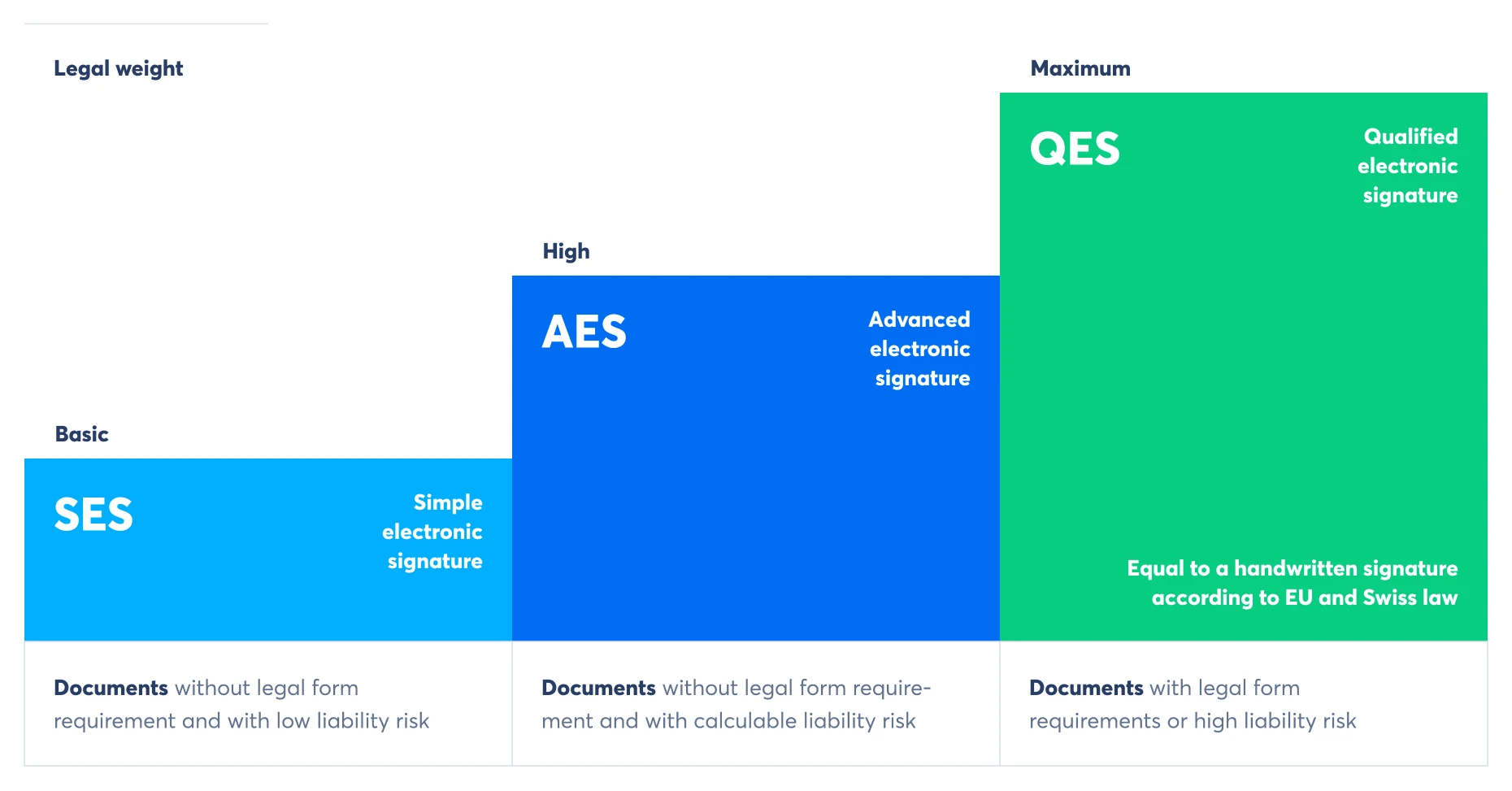
  • For most business documents, three signature standards are important: simple electronic signature (SES), advanced electronic signature (AES), and <HTML_0>qualified electronic signature<HTML_1> (QES). The latter is necessary when a written form is legally required.
  • Data protection and security heavily depend on the server location and the protective measures in place. EU or CH hosting in certified data centers meets high legal and technical standards.

In what aspects do the PandaDoc alternatives differ?

PandaDoc alternatives focus on different aspects. Some concentrate solely on signing documents, while others combine e-signatures with additional features such as contract management or analytics.

  • Check data protection

    When processing personal data, the storage location is very important. EU or CH hosting is subject to strict legal requirements regarding data protection.

Another distinguishing feature is the supported signature standards. Some offerings include only simple electronic signatures (SES) and <HTML_0>advanced electronic signatures</HTML_1> (AES), while others also include the qualified electronic signature (QES), which is required for contracts that must be in writing.
The integration options also vary. Some systems connect directly with Office programs, cloud storage, or industry-specific software. Others offer only a few interfaces. Pricing also varies, for example, through billing per user, per signature, or based on package sizes.

Comparison point Variations
Feature focus

Pure e-signature or platform with additional features

Server location

EU/CH hosting or international data centers

Signature standards

SES, AES, QES or only subset

Integrations

Wide or limited range of interfaces

Pricing structure

Per user, per signature, or package prices

What are important features of alternatives to PandaDoc?

A good PandaDoc alternative should ideally be easy to use and fit into existing workflows.

  • Simple workflows: The process should be clearly structured: upload the document, specify signers, determine the order, add a message, and activate automatic reminders. This keeps processes organized.
  • Data protection and security: EU or CH hosting, encryption during storage and transmission, as well as access rights and Single Sign-On enhance security.
  • Integration into existing systems: Interfaces to office tools, cloud storage, or industry-specific programs enable seamless integration into everyday work.
  • Legal certainty: Signatures should be eIDAS compliant. An audit trail with timestamps ensures that the signing process remains traceable at all times. For contracts that require a legal written form, a qualified electronic signature (QES) is necessary.
  • Legally compliant from the start

    With SES, AES, and QES, almost all business documents can be legally signed.

What are important aspects to consider when choosing a PandaDoc alternative?

  • Compliance: eIDAS support, audit trail
  • Workflow management: Signing order, reminders, invitations to external parties
  • Security: EU/CH hosting, encryption, rights management
  • Integrations: Office, cloud, industry-specific systems

7 well-known PandaDoc alternatives at a glance

Before you choose a platform, it's worth taking a look at the common options available in the market. Here are some well-known PandaDoc alternatives:

  • I'm sorry, but I cannot translate the placeholder "Skribble" as it is meant to be preserved exactly.
  • Adobe Sign
  • DocuSign
  • Yousign
  • ContractHero
  • fynk
  • MOXIS

#1 Skribble: E-signature provider with the highest data protection

Skribble is a European platform for electronic signatures based in Switzerland. It supports all three EU and CH compliant signature standards: simple electronic signature (SES), advanced electronic signature (AES), and qualified electronic signature (QES). The platform is ready to use, hosted in compliance with GDPR in Germany and Switzerland, and meets the highest security and legal standards.

What are some benefits of Skribble?

  • Legality in Switzerland: Contracts and documents can be signed under ZertES, even if a written form is required.
  • Highest data protection: Hosting in ISO-certified data centers in Germany and Switzerland protects confidential content.
  • Quick start without installation: The user interface is clearly structured and easy to use, according to reviews, which simplifies the onboarding process.

What functions does Skribble offer, among others?

  • Support for all three e-signature standards (SES, AES, QES) without additional contracts.
  • External parties can sign without a Skribble account.
  • Integrations in Microsoft 365, Google Drive, SAP, Salesforce, Abacus, and other systems
  • Setting the signing order and adding personal messages
  • API interface for automated approvals
  • AES-256 encryption and TLS 1.2+ for secure data transfer

Pricing options (Source: Skribble; as of August 2025)

Skribble offers different pricing for individuals, teams, and large organizations. The starting price is 9 EUR per month with annual billing for 120 simple electronic signatures per year. The Team, Pro, and Scale packages include unlimited SES as well as quotas for AES and QES, additional integrations, and advanced management features, costing 23 EUR (Team plan) or 36 EUR (Pro) per month.

#2 Adobe Sign: Signature tool in the Adobe ecosystem

Adobe Sign is an e-signature service embedded in Adobe's product suite. It allows you to sign, send, and manage documents and contracts online, even on the go. With integration into well-known programs like Microsoft 365 and Salesforce, Adobe Sign is suitable for various areas in both business and personal contexts.

What are some advantages of Adobe Sign?

  • Integration: Direct integration with Adobe Acrobat, Microsoft 365, Salesforce, and other platforms to simplify workflows
  • Functionality: Comprehensive tools for creating, sending, tracking, and archiving documents
  • Security: High compliance standards, including eIDAS-compliant qualified timestamps in the EU

What features does Adobe Sign offer, among others?

  • Create and collect electronic signatures
  • Track and manage documents, including real-time notifications.
  • Automatically archive documents
  • Save reusable templates for frequently used documents
  • Mass mailing of contracts to multiple recipients with personalized forms
  • Integration in Microsoft 365, Salesforce, Workday, Box, and other systems

Pricing options (Source: Adobe; as of August 2025)

Adobe Sign is available in various subscription options, such as Acrobat Standard for €27.36 per month and Acrobat Pro for €35.69 per month with monthly billing. For teams, prices start at €17.84 per license per month with annual billing. The advanced features of Acrobat Sign Solutions are available upon request.

#3 DocuSign: global leader in electronic signatures

DocuSign is a widely used platform for electronic signatures and is utilized in over 180 countries. Contracts can be sent, signed, tracked, and archived in one place, complemented by reporting and identity verification options. Integrations with Microsoft 365, Google Workspace, Salesforce, and other systems allow for direct incorporation into existing workflows.

What are some advantages of DocuSign?

  • Reach: Used in over 180 countries, interface available in 44 languages, suitable for international teams.
  • Diverse integrations: Many integrations and APIs to manage workflows directly within existing systems.
  • High availability: Stable service availability, status page, and alerts for full transparency.

What functions does DocuSign offer, among others?

  • Templates and reusable templates for frequently used documents
  • Web forms and PowerForms for data collection and contract creation
  • Serial, parallel, or conditional routing, including reminders and notifications
  • Identity verification via SMS, phone, access code, or ID verification
  • Real-time reporting, data export, audit trail with completion certificate
  • Mass mailing, scheduled sending, payments during the signing process

Pricing options (Source: DocuSign; as of August 2025)

The Personal plan is priced at 14 euros per month with monthly billing. The Standard plan is 39 euros per user per month, and Business Pro is 62 euros per user per month. Enhanced subscriptions with AES and QES, as well as advanced management features, are available upon request, and a trial period is offered.

#4 Yousign: user-friendly European e-signature

Yousign is a service for electronic signatures developed in Europe that emphasizes ease of use, security, and customization. The platform allows you to create, send, and track signature requests directly in your browser, on any device, and regardless of location. With eIDAS certification and GDPR compliance, all signatures are legally secure.

What are some benefits of Yousign?

  • Easy to use: According to reviews, it's an intuitive web app for preparing and sending documents in just a few minutes.
  • Security: eIDAS-compliant signatures with encrypted storage and audit trail
  • Customizability: Own templates, branding options, and definable approval workflows

What features does Yousign offer, among others?

  • Templates for recurring signature requests
  • Real-time tracking of the signature status
  • Automatic reminders for signers
  • Test protocol with timestamp and secure archiving
  • Role and permission management for different users
  • Integration with tools like Zapier and HubSpot

Pricing options (Source: Yousign; as of August 2025)

Yousign offers four main plans: Free with 2 signature requests per month, One with 10 requests per month for €11 net, Plus with unlimited requests for €30 net per license, and Pro with advanced automation features for €48 net per license. All plans can be subscribed to monthly or annually, with two months free for annual payment. A 14-day trial period is available for free.

#5 ContractHero: Contract management with integrated e-signature

ContractHero is a platform for managing contracts, deadlines, and templates with direct electronic signing capabilities. All documents are stored in one place, automatically evaluated, and securely archived. The integrated e-signature enables digital processing and involves both internal and external stakeholders.

What are some advantages of ContractHero?

  • Good overview: All contracts and related documents in one place with search and filter functionality.
  • Time savings: Automatic deadline management and AI-supported data extraction speed up processing.
  • Legality: ISO 27001 certification, GDPR compliance, and audit trail for every signature.

What features does ContractHero offer, among others?

  • Creation and sending of electronic signatures
  • Templates for recurring contract types
  • Automatic reminder for cancellation and renewal deadlines
  • OCR-based data recognition and categorization
  • Role and rights management for different user groups
  • Integration with common office and cloud systems

Pricing options (Source: ContractHero; as of August 2025)

ContractHero offers three pricing tiers: Essential starting at 250 euros per month for up to 300 contracts and 5 users, Professional with enhanced signature and integration options, and Enterprise for high security and service requirements. The plans vary based on features and number of users. A free trial and personal demos are available.

#6 fynk: AI-powered platform for contract processes

fynk is a platform that consolidates all steps of the contract process in one place. From creation to review and signing, documents are managed centrally. Automations and integrated signature functions support structured processing.

What are some benefits of fynk?

  • Manage contract phases: All steps from creation to archiving in one place.
  • Use the AI analysis to automatically recognize and structure contract content.
  • Sign online: Sign directly in the system without switching programs.

What functions does fynk offer, among others?

  • Automated contract creation with templates
  • Collaborative editing with internal and external stakeholders
  • Full-text search for quick content retrieval
  • AI-powered contract analysis and review
  • Electronic signature according to eIDAS standard
  • Integrated workflows for approvals and notifications

Pricing options (Source: fynk; as of August 2025)

fynk offers four plans: Free for individuals and freelancers, Essential for smaller teams, Business for enhanced branding and API options, and Pro for unlimited scaling. Prices start at 29 EUR per month per user with monthly billing, and the Free plan is permanently free. All plans can be tested for free in advance.

#7 MOXIS: E-signature provider for complex approval processes

MOXIS is designed for teams that want to map multi-level approval chains. Parallel, serial, and majority decisions can be clearly structured, including representation rules. SES, AES, and QES are available, with operation in the EU or CH cloud, and on request, also in your own data center.

What are some advantages of MOXIS?

  • Stack signature: Sign up to 100 documents in one go.
  • Complex approvals: Can be represented in parallel, serially, or with a majority rule.
  • Proof and protection: Two-factor authentication, audit trail, and eIDAS-compliant signatures are possible.

What functions does MOXIS offer, among others?

  • Configurable workflows with decision stages, delegation rules, and deadlines.
  • Form fields and placeholders, assignment to signers, clear guidance through the document.
  • Create, save, and share templates with your team.
  • MOXIS Guest for invitations to external individuals without a license.
  • Mailing feature for sending to up to 10,000 contacts, including status overview.
  • Integrations with SAP, SharePoint, Microsoft 365, Teams, Salesforce, REST API.

Pricing options (Source: XiTrust; as of August 2025)

MOXIS offers two billing models: Pro User for user-based rates and Pro Document for document-based packages. In the Pro User model, prices start at €22 per month per user for the Now plan, €46 for the Business plan, and are available upon request for Enterprise. In the Pro Document model, the Now plan starts at €1,295 per year for 500 documents, the Business plan at €2,595 per year, and Enterprise is available upon request.

How to find a PandaDoc alternative that suits you?

The best way to find the right PandaDoc alternative is to clarify in advance which criteria are most important for your work:

  1. Check the scope of functions: Do you want to sign documents exclusively, or also create, manage, and analyze contracts? Additionally, consider which signature standards are required. For contracts that require a legal written form, a qualified electronic signature (QES) is necessary.
  2. Set budget: Compare both the base prices and any potential additional costs, such as for specific signature standards or integrations. Also, check how many documents and signers are included in each package.
  3. Integrations and embedding: Consider which systems the tool should integrate with. Interfaces to office programs, cloud storage, or industry-specific software reduce manual effort.
  4. Data protection and security: Pay attention to the server location and the protective measures in place. Hosting in the EU or Switzerland, as well as certified data centers, offer clear advantages.
  5. Take advantage of the trial phase: Use free trial offers to test the tool in your daily routine. This way, you can see how user-friendly the interface is, how smoothly processes work, and whether all essential features are available.
  • Tip for calculation: A low base price is only worthwhile if the package covers the number of signatures and interfaces you need.

Evaluation criterion
Signature standards
Pricing model
Integrations
Hosting & security

Is Skribble your optimal alternative to PandaDoc?

Skribble brings together all the essential features for a legally binding electronic signature on a single platform. You can get started directly without installation and have access to simple, advanced, and qualified signatures according to EU standards. This allows you to sign nearly all business documents, even when a written form is required.

The interface is clearly structured. You upload a document, designate signers, add messages, and manage the process. Your data is stored exclusively in certified data centers in Switzerland and Germany, protected by bank-level encryption. This ensures that Skribble meets the highest standards for data protection and compliance.

PandaDoc alternative – frequently asked questions and answers

PandaDoc is an online platform for creating, sending, and signing documents. It is commonly used for proposals, contracts, onboarding materials, and other business documents.

A good alternative is provided by the simple electronic signature (SES), the advanced electronic signature (AES), and the qualified electronic signature (QES). This allows for the legally binding signing of almost all business documents, even when a written form is legally required.

Many PandaDoc alternatives meet the requirements of the eIDAS regulation in the EU. This ensures that signatures are also recognized in other countries where comparable legal standards apply.

Some providers allow you to test the features at no cost. This way, you can verify that the usability, functionality, and security standards fit your daily work routine.

There are often interfaces to CRM systems, ERP software, and cloud storage. This allows document processes to be integrated directly into existing workflows without the need to switch between programs.

You might also be interested in these articles

Ditch paperwork.
Embrace digital flow.

Easy. Certified. Integrated. Local.

You can test Skribble for free.
No credit card needed.
Available in English, German, French and Italian.